
Writing Faster JavaScript with Async/Await: Sequential vs Concurrent Execution Explained
October 18, 2024
Introduction
Ever found yourself wondering why your async code feels slow, even though everything's using await?
Maybe you’ve written something like this:
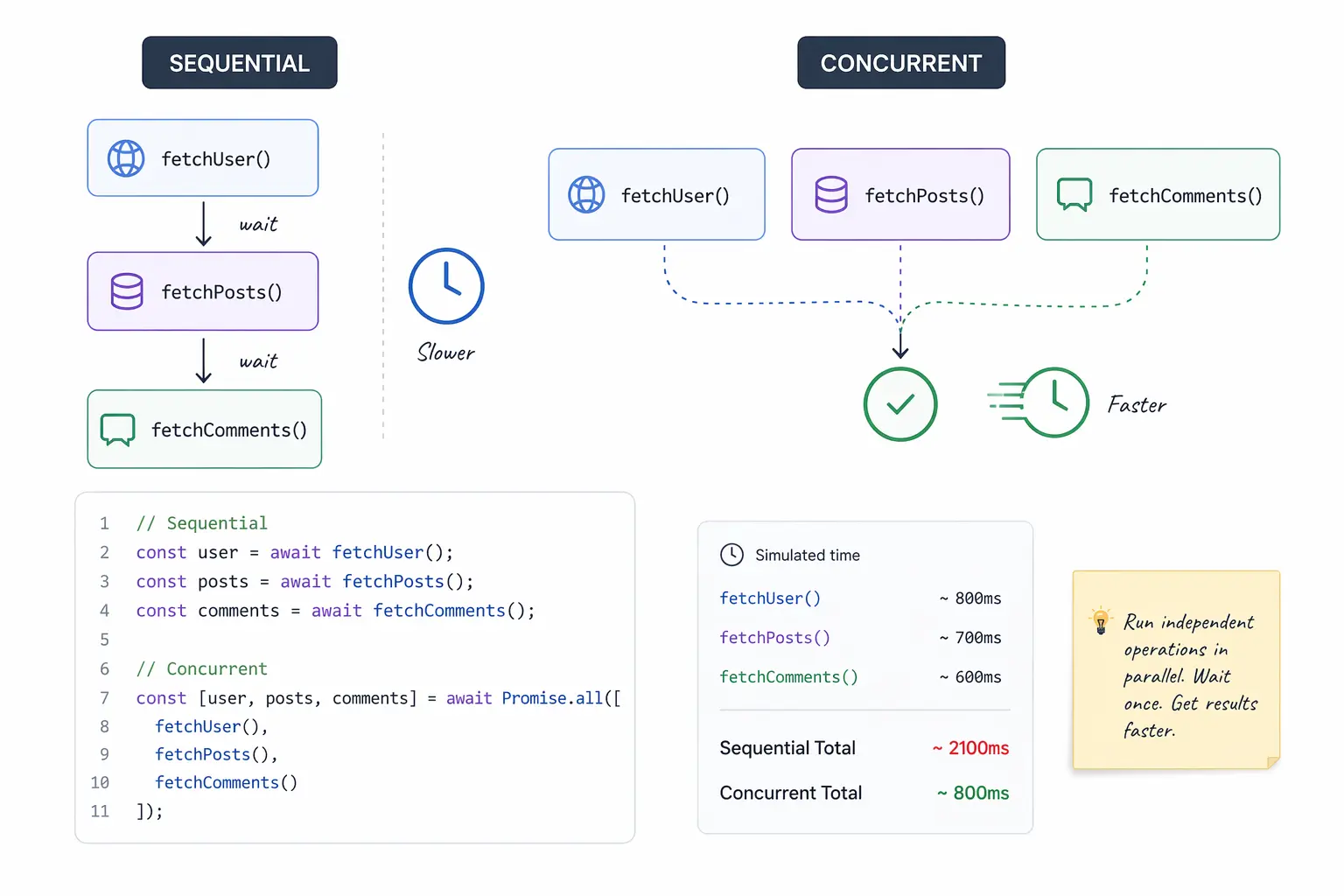
Looks clean, right? But here’s the catch: this runs one after the other, even if those API calls don’t depend on each other.
What if I told you that by just restructuring your code, you could make it run 3x faster — without adding threads, workers, or extra complexity?
That’s where understanding how sequential, concurrent, and what many call “parallel” execution comes in — all using simple async/await patterns and Promise.all.
In this post, we’ll break down three ways async code can execute:
- 🐢 Sequentially – one by one, in order.
- 🚶 Concurrently – all at once, but still on a single thread.
- ⚙️ Parallelly – not needed in most web apps, and we won’t focus on that here.
This isn’t just theory — you’ll see exactly when to use which approach, how to avoid common mistakes like await in loops, and how to structure your code for performance without overengineering.
Let’s dive in and make your async code faster and smarter.
Sequential Execution
What It Means
Each task starts after the previous one completes.
Example:
Want to know when to use this? 👉 See the full comparison table below.
2. Concurrent Execution (a.k.a. "Parallel" in JavaScript)
What It Means
All tasks are started together, and you wait for all to finish using Promise.all.
Despite running on the same thread, JavaScript overlaps I/O tasks efficiently using its event loop. This looks and feels like parallel execution.
Example:
Even if
getUser,getPosts, andgetCommentsareasyncfunctions, they can all run together insidePromise.all.
3. True Parallelism (You Probably Don’t Need This)
Quick Note:
True parallelism — like multithreading or using Web Workers / Node.js Worker Threads — is rarely needed for most JavaScript apps.
Why? Because:
- Most async work in JS (like API calls, file reads, DB queries) is I/O-bound, not CPU-bound.
- You get "parallel-like" performance already with
Promise.all.
Use threads only when doing CPU-heavy stuff like image processing, encryption, or parsing large datasets.
This post focuses on real-world concurrency — no threads required.
Comparison: Sequential vs Concurrent vs Parallel Execution
| Execution Type | Pros | Cons | Best Use Cases |
|---|---|---|---|
| Sequential | ✅ Simple and easy to read ✅ Ideal when tasks depend on each other | ❌ Slower when tasks are independent ❌ Wastes time on I/O waits | 🔁 Step-by-step operations (e.g., login → fetch user → load dashboard) |
| Concurrent | ✅ Much faster for independent tasks ✅ Easy with Promise.all | ❌ One failure cancels all ❌ Slightly harder to debug errors | 🚀 Multiple API calls, DB queries, or file reads at once |
"Parallel" (via Promise.all) | ✅ Simulates parallelism without threads ✅ Maximizes I/O overlap | ❌ Still single-threaded ❌ Not for CPU-heavy operations | 📦 Bulk async processing (e.g., loading 100 images or user records together) |
Note: In JavaScript, concurrent and “parallel” execution often mean the same thing when working with I/O — both can be done using
Promise.all.
Common Mistake: Using await Inside a Loop
❌ Bad (runs sequentially):
✅ Better (runs concurrently):
Always ask: Do these tasks depend on each other? If not, run them together!
Real Performance Comparison
Let’s say each API call takes ~200ms.
🐢 Sequential:
🕒 Total time = ~600ms
⚡ Concurrent with Promise.all:
🕒 Total time = ~200ms (runs in parallel-like manner)
When Should You Use Each?
| Situation | Use This |
|---|---|
| Tasks must run in order (dependent) | Sequential |
| Independent API calls or DB queries | Concurrent |
| Bulk processing of items in a loop | Concurrent |
| CPU-intensive task (e.g., video encoding) | Workers (rare) |
Summary:
JavaScript gives you powerful tools to handle asynchronous tasks — but it’s your structure that determines performance.
🧠 You don’t need threads to go fast — just smart use of
Promise.all.
Keep this rule of thumb in mind:
- Use
awaitwhen steps depend on each other. - Use
Promise.allwhen they don’t. - Avoid sequential loops unless absolutely necessary.
Structure your async code intentionally, and your apps will feel faster, smoother, and more reliable — without needing to overengineer with threads or external tools.