
JavaScript Under the Hood: Mastering the Event Loop, Call Stack, and Async Magic
December 8, 2024
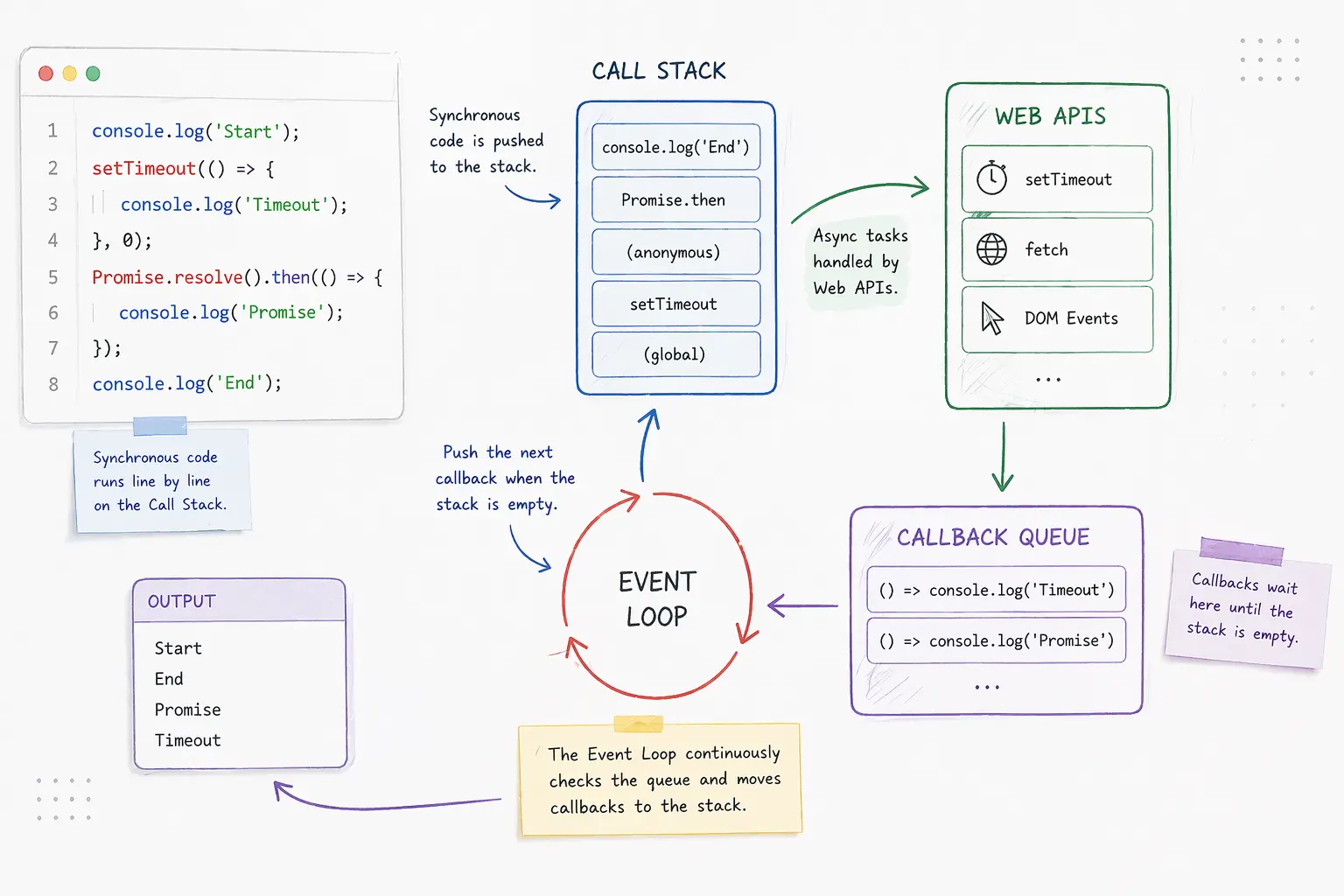
JavaScript is a single-threaded language; however, it can handle multiple tasks simultaneously, such as animations, element/button clicks, API responses, and more. This is possible through the Event Loop, aided by the Call Stack, Web APIs and the callback queue.
In this post, we’ll break down exactly how JavaScript handles asynchronous code, step by step, in a way that’s easy to grasp even if you’re just getting started.
The Call Stack: Where Code Runs
JavaScript executes one command at a time, and this execution occurs within the Call Stack, a data structure that follows the Last IN, First Out (LIFO) principle. For example, when you call a function, it gets pushed to the stack. Once the function finishes executing, it’s popped off the stack.
Example:
Call Stack Sequence:
global()— Represents the main script runninggreet()is pushedconsole.log()is pushed and executedconsole.log()is poppedgreet()is poppedglobal()is popped after execution completes
Web APIs: Asynchronous Work Outside JS
This is a key point that many developers first overlook: setTimeout, setInterval, fetch, and other asynchronous features are not part of the JavaScript language itself. They are methods provided by the host environment, like the web browser or Node.js runtime.
The JavaScript engine—like V8 in Chrome or SpiderMonkey in Firefox—only understands the language core (like variables, loops, functions, and promises). Asynchronous capabilities such as timers and network calls are implemented by the environment in which JavaScript runs.
How it Works Internally:
When you run code like this:
Here’s what actually happens:
- JavaScript encounters
setTimeout()and sends the timer operation to the Web API layer. - The browser or Node.js starts the timer in parallel (outside the JS engine).
- When the timer finishes, the callback function is added to the Callback Queue.
- The Event Loop monitors the stack and queue, and when the Call Stack is empty, it pushes the callback into the stack.
This design keeps JavaScript lightweight, modular, and non-blocking.
Other Web API examples include:
fetch()for network requestsaddEventListener()for event handlingsetInterval()for repeated intervalsrequestAnimationFrame()for rendering animationsMutationObserver,Geolocation API, and more
Alternatives in Different Contexts
Depending on the environment or needs, alternatives and equivalents exist:
- Node.js provides similar timer functions like
setTimeout,setImmediate, andprocess.nextTick. - requestIdleCallback(): Lets the browser decide when to run a callback during idle periods.
- queueMicrotask(): Schedules microtasks to run immediately after the current task.
- Web Workers: Run code on separate threads for heavy computations.
These tools expand the async toolbox depending on what you’re trying to achieve.
Callback Queue: Waiting Their Turn
The Callback Queue holds functions that are ready to run after their async tasks finish. However, they don’t run immediately. They must wait until the Call Stack is empty.
This ensures that JavaScript's single-threaded nature isn't violated.
The Event Loop: The Traffic Controller
The Event Loop keeps an eye on both the Call Stack and the Callback Queue.
- If the Call Stack is not empty, the Event Loop waits.
- If the Call Stack is empty and the Callback Queue has functions, it moves one function from the queue into the stack to run.
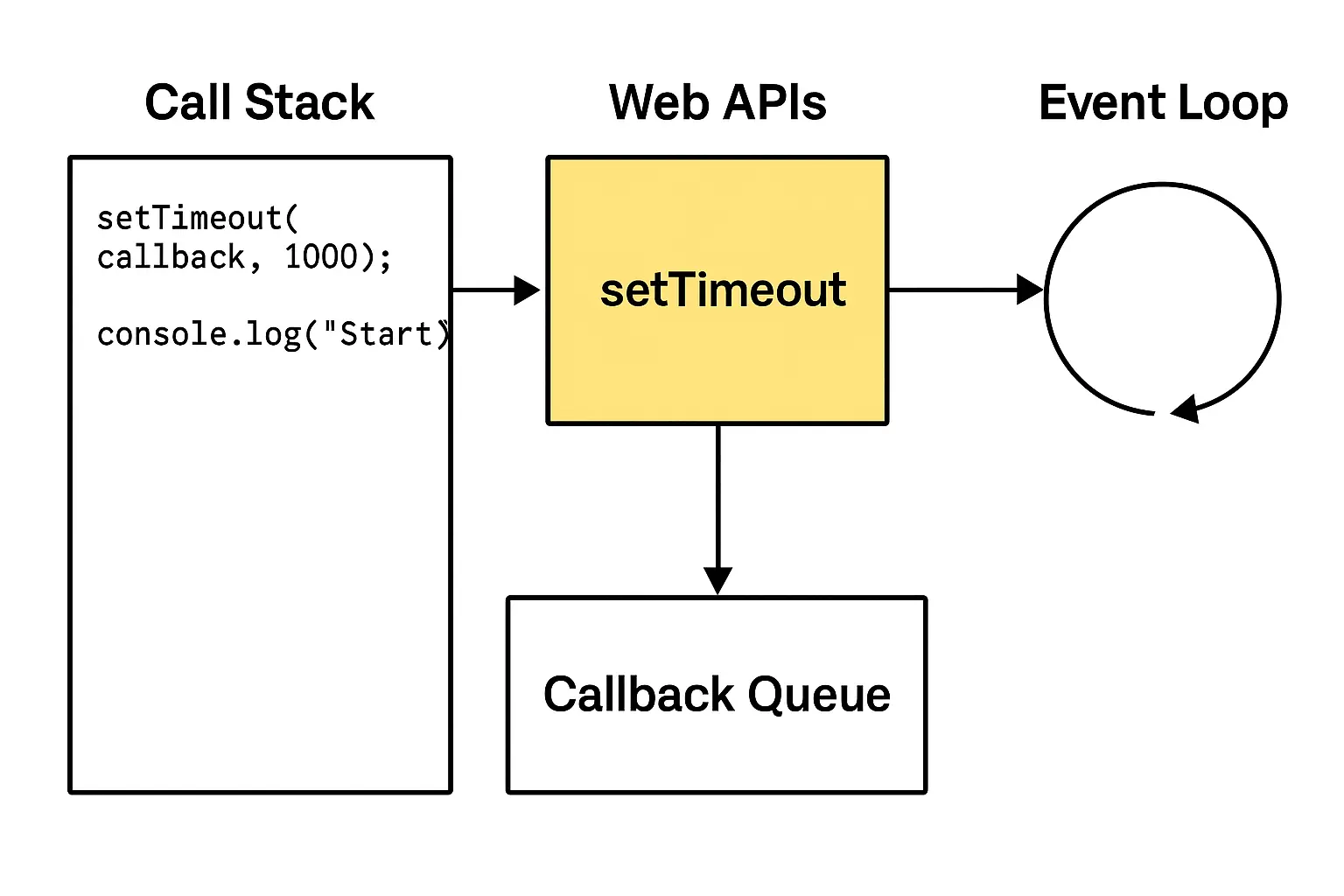
Diagram Summary:
- Call Stack: Runs sync code
- Web APIs: Handle async tasks
- Callback Queue: Holds ready-to-run callbacks
- Event Loop: Moves callbacks to the stack when ready
Full Example:
Output:
Why? Even with a 0ms delay, the callback waits in the queue until the stack is empty.
Long-Running Code Blocks Asynchronous Execution
A common misconception is that setTimeout(..., 0) or similar async calls run "instantly" after the specified delay. But in JavaScript, they only run once the Call Stack is completely clear.
Example:
Output:
Even though the timer delay was 0 milliseconds, the Timeout callback runs last. That’s because the long for loop blocks the Call Stack, and the Event Loop cannot push anything new onto it until the loop is finished.
How to Avoid This:
If you have a heavy or time-consuming task:
- Break it into smaller chunks using
setTimeout,requestIdleCallback, orqueueMicrotask - Offload processing to Web Workers for background execution
This ensures the UI stays responsive and async callbacks can run when ready.
SEO & Performance Insight: Why This Knowledge Matters
Mastering JavaScript’s event loop and async model helps you:
- Avoid performance bottlenecks in web apps
- Write responsive, non-blocking code that keeps UI smooth
- Improve load time and perceived speed—key ranking signals for search engines
These improvements aren’t just good for users—they’re also recognized by search engines like Google, which prioritize speed and interactivity in modern SEO.
Final Thoughts
JavaScript may be single-threaded, but thanks to the Event Loop, it multitasks like a champ. By understanding the Call Stack, Web APIs, Callback Queue, and Event Loop, you'll unlock a powerful new perspective on writing efficient, asynchronous JavaScript.
Whether you're optimizing user experience or fixing tough bugs, this knowledge will elevate your game.